Mailgun
The Mailgun Email action node enables your workflow to send reliable, authenticated emails through Mailgun.
It’s ideal for transactional messages, notifications, and automated communication built directly into your DSentr workflows.
Like the SendGrid node, Mailgun lets you send simple custom messages or leverage preconfigured templates hosted in your Mailgun account.
The node manages all authentication and delivery so you can focus on automation, not SMTP headaches.
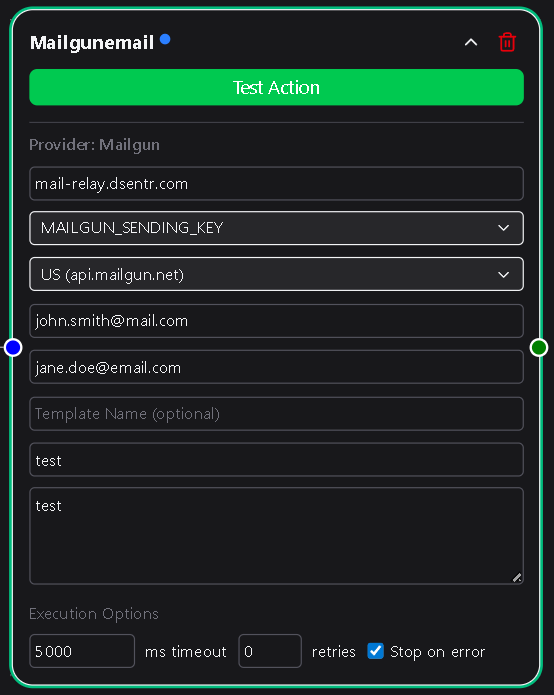
Configuration
Domain
Your Mailgun domain—for example:
mg.yourdomain.com
This domain must exist in your Mailgun account and be properly verified to send emails.
You can find it under the Domains section of your Mailgun dashboard.
Required
Sending Key
The API key associated with your Mailgun domain.
When you enter it, DSentr securely stores it under Settings → Secrets & API Keys in the Mailgun section for reuse in other workflows.
You can generate a new sending key in your Mailgun dashboard under Settings → API Keys.
Required
Location
Choose the API endpoint based on your account region:
- US →
api.mailgun.net - EU →
api.eu.mailgun.net
This ensures your workflow connects to the correct Mailgun data center for your domain.
Required
Email Sender
The email address that appears in the From field.
Example:
[email protected]
This address must belong to your verified Mailgun domain.
Required
Email Recipients
A comma-separated list of one or more recipient addresses.
For example:
[email protected], [email protected], [email protected]
Required
Template Name (optional)
If you use Mailgun templates, you can enter the template name here to send dynamic messages defined in your Mailgun account.
When a template name is provided:
- The Subject and Body fields are hidden.
- A Template Variables section appears where you can define key-value pairs for template placeholders.
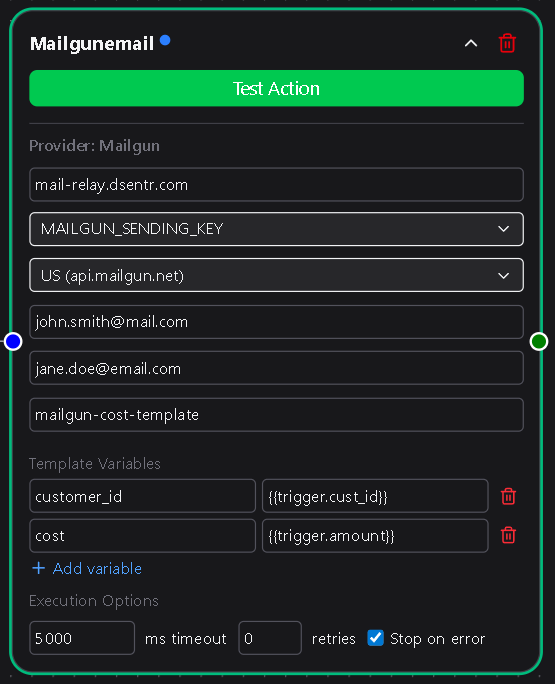
Each variable represents a placeholder defined in your Mailgun template.
For example, if your template contains variables like {{recipient_name}} or {{order_id}}, you can define:
| Key | Value |
|---|---|
| recipient_name | {{trigger.customer_name}} |
| order_id | {{action.latest_order_id}} |
These variables are replaced automatically when the email is sent.
If the Template Name field is empty, the Subject and Body fields appear instead.
Optional
Subject
The subject line of the email.
Visible only when Template Name is left blank.
Required if Template Name is blank
Body
The message content of the email, supporting both plain text and HTML.
Visible only when Template Name is left blank.
Required if Template Name is blank
Usage Notes
- Mailgun requires DNS verification before you can send from a custom domain. Make sure your SPF and DKIM records are set correctly.
- Template variables can reference data from other nodes using DSentr’s templating syntax, such as
{{trigger.email}}or{{workflow.output_message}}. - Error messages from Mailgun’s API (invalid domain, missing fields, or template errors) appear in your workflow’s Run Logs for easy troubleshooting.
- The node handles all authentication securely through stored credentials—you never expose API keys directly in workflows.
Example Use Cases
- Send automated signup confirmations or password reset emails.
- Deliver purchase receipts or shipping notifications using Mailgun templates.
- Notify teams or users dynamically by combining this node with conditional logic.
The Mailgun Email node provides a fast, dependable bridge between DSentr and Mailgun’s email delivery network.
Whether you’re sending a few messages or scaling to thousands per day, this node keeps your communication automated, authenticated, and on brand.