Run Code
The Run Code node lets workflows execute custom JavaScript using data from previous nodes and output results for later steps.
It’s ideal for transforming data, performing calculations, or adding logic between actions.
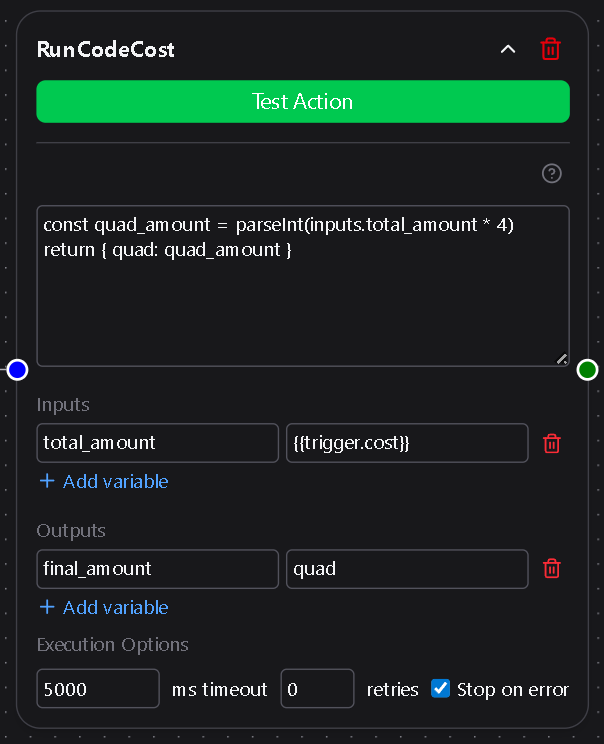
Quick Overview
| Use Case | Description | Example |
|---|---|---|
| Transforming or combining inputs | Apply logic or calculations between nodes | Parse JSON, sum values, clean data |
| Conditional logic | Control downstream flow with computed results | Return flags or booleans |
| Data shaping | Format output for APIs or messaging nodes | Build structured objects |
1. JavaScript Code
This is the main text area where you write your script.
The script executes when the workflow runs and can access any defined Inputs.
You must include a return statement to produce output.
Example:
const total = Number(inputs.price) * Number(inputs.quantity)
return { total }
2. Inputs
Optional key–value pairs that make data from previous nodes available inside the script.
Each key becomes a property on the inputs object, and all values are treated as strings.
Example mapping:
name → Jason
price → 25
Example usage:
const message = `Hello, ${inputs.name}! Each item costs $${inputs.price}.`
return { message }
3. Outputs
Optional key–value pairs that map properties from your returned object to named outputs.
These outputs become available to downstream nodes in the workflow.
- The key is the name you want to reference later.
- The value must match a property name from your returned object.
Example:
return { greeting: "Hello" }
Output mapping:
greeting → greeting
Reference later:
{{run_code.greeting}}
4. Behavior
Object Return
When your script returns an object, each top-level property becomes available for mapping in Outputs.
Example:
return { total: 42, status: "ok" }
Available outputs: total, status
Primitive Return
When your script returns a primitive (string, number, or boolean), Dsentr automatically wraps it in an object with a single key result.
Example:
return "Done"
Reference later:
{{run_code.result}}
5. Quick Tips
- Use
${inputs.key}to reference input values in strings. - Always include a
returnstatement; otherwise, no data is passed downstream. - Return an object to define multiple named outputs.
- Return a primitive for a single default output under
result. - Keep your logic self-contained—each run executes in isolation.
- Syntax errors in your code will fail the node’s execution log entry.
The Run Code node is the bridge between structured automation and free-form logic, giving you full control when prebuilt nodes aren’t enough.