HTTP Request
The HTTP Request node allows your workflows to make direct API and webhook calls.
Use it to send data to remote endpoints, integrate external systems, or connect with services that don’t yet have native DSentr nodes.
Overview
This node is one of the most versatile tools in DSentr. It gives you complete control over how HTTP requests are sent, including custom headers, query parameters, authentication methods, and timeout behavior.
Whether you’re posting JSON to a webhook or fetching data from an external API, this node forms the backbone of many advanced workflows.
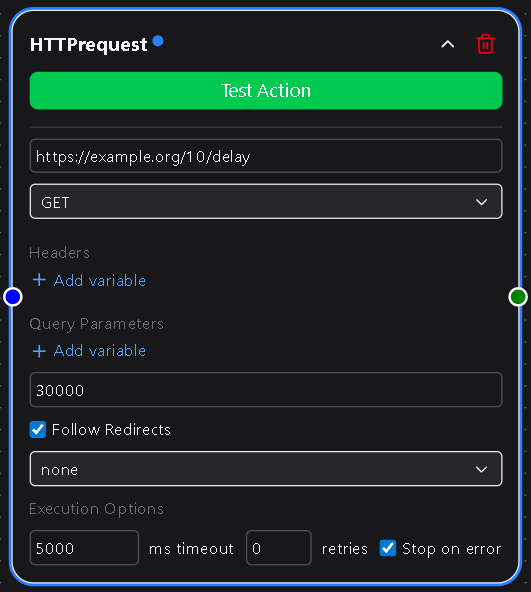
Configuration
URL
The endpoint that the request will be sent to.
Must be a valid HTTP or HTTPS URL.
Required
Important: Avoid calling Dsentr endpoints from inside your workflow
If you enter a URL that points to a Dsentr domain (such as your own webhook trigger URL), your workflow can trigger itself in a loop. Each loop counts as a separate run and will continue until your workspace run limit or overage charges apply.
Use caution when calling any dsentr.com URL from an HTTP Request node.
Only do this intentionally and with guards such as conditions or rate limiting.
HTTP Method
Defines how the request interacts with the endpoint.
Choose from:
- GET – Retrieve data
- POST – Send or create data
- PUT – Replace an existing resource
- PATCH – Partially update a resource
- DELETE – Remove a resource
- HEAD – Request headers only
- OPTIONS – Inspect supported methods
Required
Headers
Add key-value pairs such as Content-Type, Authorization, or any custom header required by your API.
Headers support DSentr variable templating (e.g., {{trigger.email}}).
Optional
Query Parameters
Add querystring key-value pairs that will automatically append to the URL.
Useful for filters, pagination, or passing tokens.
Example:
?status=active&page=2
Optional
Timeout (ms)
Defines how long the request waits for a response before timing out.
Default: 30000 (30 seconds).
Increase for slower APIs.
Required
Follow Redirects
A checkbox that controls whether DSentr should follow HTTP 3xx redirects automatically.
When enabled, DSentr follows all redirects until the final response.
When disabled, it captures the redirect response for manual inspection.
Optional
Authentication
The Security Logic dropdown determines how authentication is handled for the request.
None
No credentials are applied.
Use this for open or public APIs.
Basic Authentication
Displays two fields:
- Username — The plain username used in the
Authorizationheader.
Required - Password — A dropdown to choose or create a password stored securely in Secrets & API Keys.
Required
DSentr automatically base64-encodes and applies credentials to the header:
Authorization: Basic <encoded_credentials>
Bearer Token
Displays one field:
- Bearer Token — Select or create a bearer token stored in Secrets & API Keys.
Required
When used, DSentr includes it as:
Authorization: Bearer <token>
All stored secrets are encrypted and never exposed in plaintext.
Behavior
- Each request includes a complete response object (status code, headers, and body).
- JSON responses are automatically parsed for use by downstream nodes.
- Non-2xx responses (e.g.,
404,500) will mark the node as failed unless explicitly handled. - Template variables can be used anywhere in the request (URL, headers, body, or parameters).
- Supports dynamic URLs and payloads to integrate with any system that accepts HTTP calls.
Example Use Cases
- Trigger an external webhook after a successful workflow run.
- Send POST data to a REST API endpoint.
- Fetch and process data from a third-party service.
- Update resources in an external system.
- Chain multiple HTTP requests together to form advanced API flows.
Example Configuration
| Field | Example |
|---|---|
| URL | https://api.example.com/users |
| Method | POST |
| Headers | Content-Type: application/json |
| Query Parameters | team=marketing |
| Timeout | 30000 |
| Follow Redirects | ✅ |
| Security Logic | Bearer |
| Bearer Token | {{secrets.api_token}} |
Tips
- Use template variables to build dynamic payloads that include workflow data.
- Check API rate limits when chaining multiple requests.
- Keep your Secrets organized in Settings → Secrets & API Keys to simplify reuse across workflows.
- For debugging, log full request and response data using a downstream node.
The HTTP Request node is a cornerstone of advanced automation in DSentr.
It bridges your workflows with nearly any API or service on the internet, giving you unlimited integration possibilities.