Formatter
The Formatter node reshapes, converts, or cleans workflow data before passing it to downstream steps.
Use it to extract values from complex objects, normalize text, manipulate numbers, convert dates, and build structured JSON.
Formatter evaluates an input value, applies a chosen operation, and stores the result under an output key for downstream nodes.
Overview
Formatter performs synchronous, CPU-only transformations.
Every operation is typed and predictable. The output is available to templates, conditions, and action nodes.
Typical uses:
• Extract nested fields from JSON responses
• Clean or normalize strings
• Perform arithmetic on templated values
• Convert dates and timestamps
• Build JSON fragments for outbound requests
Configuration
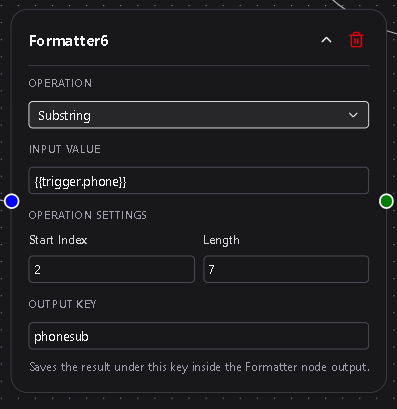
Formatter exposes four configuration areas.
Operation
A dropdown selecting the transformation to apply.
Grouped into Strings, Numbers, JSON, Dates, Booleans, and Type Conversion.
Required
Input Value
The value to transform.
Accepts literal text or Dsentr templates such as {{trigger.email}}.
Required
Operation-Specific Fields
Displayed only when relevant to the chosen operation.
Defines operands, delimiters, date formats, JSON paths, etc.
Output Key
A variable name that stores the result.
Must be a valid identifier: letters, numbers, underscores; no spaces.
Required
Operation Groups and Details
Below is a complete reference of all operations and their fields.
String Operations
Trim
Removes leading and trailing whitespace.
Fields: none
Lowercase
Converts text to lowercase.
Fields: none
Uppercase
Converts text to uppercase.
Fields: none
Replace
Replaces all occurrences of a substring.
Fields:
• Search For
• Replace With
Example:
ACME-123 → ACME_123
Split
Splits a string and returns a single segment.
Fields:
• Delimiter
• Index (zero-based)
Example:
a,b,c with index 1 → b
Substring
Extracts characters from input.
Fields:
• Start Index
• Length
Number Operations
Input is parsed as a number.
Add / Subtract / Multiply / Divide
Applies arithmetic.
Field:
• Value (number)
Divide protects against zero.
Round
Rounds to a fixed precision.
Field:
• Decimal Places (0–15)
Convert to Number
Parses the input into numeric form.
Fields: none
JSON Operations
Input must be valid JSON.
Pick Field
Extracts a nested value using dotted paths.
Field:
• JSON Path
Example path: items.0.id
Flatten
Converts nested JSON structures into a flat object with dotted keys.
Example:
{"a":{"b":1},"c":[10,20]}
Becomes:
{"a.b":1,"c.0":10,"c.1":20}
Fields: none
Merge
Merges two objects.
Field:
• Second JSON Input
Keys from the second object override existing values.
Convert to Array
Converts strings or arrays into a JSON array.
Fields:
• Delimiter
• Trim Items (toggle)
Examples:
• "a, b ,c" → ["a","b","c"]
• JSON arrays stay arrays
Convert to Object
Creates an object with the input value under a chosen key.
Field:
• Key Name
Example: input "hello" → {"msg":"hello"}
Date Operations
Supports ISO8601, RFC2822, YYYY-MM-DD, MM/DD/YYYY, Unix seconds, Unix milliseconds.
Parse
Parses input using a selected format.
Field:
• Input Format
Format
Converts a date into another format.
Field:
• Output Format
Supported formats:
• rfc3339
• rfc2822
• date_only
• datetime
• us_short
• unix_seconds
• unix_milliseconds
Add/Subtract Time
Adjusts a date by offsets.
Fields:
• Days
• Hours
• Minutes
At least one must be non-zero.
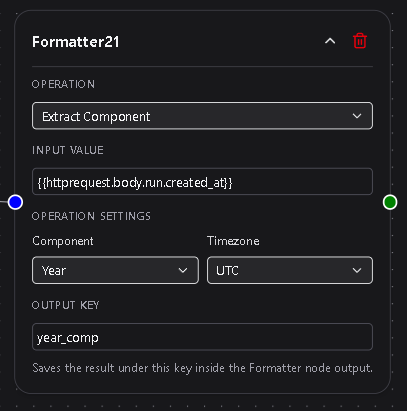
Extract Component
Extracts a single attribute.
Fields:
• Component (year, month, day, hour, minute, second, weekday)
• Timezone (IANA zone)
Boolean Operations
To Boolean
Interprets various types as true/false.
Truthy examples: "true", "yes", "1"
Falsey examples: "", "0", "false"
Is Empty
Returns true for empty values:
• empty string
• null
• false
• empty array
• empty object
Type Conversion
Convert to String
Converts any value to text.
Examples:
• Number → "42"
• Boolean → "true"
• JSON → serialized string
Behavior
• Executes synchronously with no network calls.
• Output values retain their native type.
• Downstream templates access them via {{formatter.output_key}}.
• Formatter never overwrites trigger or action namespaces.
• Outputs are snapshot-friendly for resumed delayed workflows.
• JSON path resolution uses the same logic as HTTP Response mapping.
Example Use Cases
• Extract order.items.0.id from an API response
• Normalize names before storing or matching
• Convert timestamps into readable forms
• Merge partial payloads before sending to an external service
• Break up long strings into structured arrays
Best Practices
• Use descriptive keys like clean_email or parsed_timestamp.
• Keep transformations simple; chain Formatter nodes when needed.
• Normalize data types early in a workflow.
• Preview JSON fields to avoid path errors.
• Use Flatten before Pick Field when dealing with extremely nested structures.